China Visa
China Visa Photo 33x48mm Checker & Online Tool (COVA)
Free online China visa photo tool: check your photo, then get a 420x560px file placed for the COVA online form's crop box (40-120KB) and 33x48mm prints on a pure white background.
Last updated Nov 13, 2026
Verified against the official source · Oct 8, 2026Official China Visa Photo Dimensions & Requirements (33x48mm)
The Chinese visa photo has strict requirements that are more specific than many other visa formats. COVA-style checks can reject photos for visible jewelry, hidden ears, covered forehead, shadows, or a background that is not pure white.
- Dimensions: 33mm wide x 48mm high.
- Online form (COVA): JPEG up to 420x560 pixels, 40-120KB.
- Background: Pure white only.
- Jewelry: No earrings or necklaces allowed.
- Ears: Keep both ears visible — hair partially covering an ear is usually fine, but avoid hiding an ear completely.
- Forehead: Must be visible (no bangs covering eyebrows).
Why COVA Rejects China Visa Photos
The COVA (China Online Visa Application) form uses automated photo checks. The risky details are not just size: both ears, forehead visibility, jewelry, face shadows, and pure-white background all matter.
- Remove earrings, necklaces, visible piercings, and decorative accessories.
- Pull hair back so both ears and the forehead are visible.
- Use a pure white background with no shadows or color cast.
- Avoid glasses, filters, screenshots, and low-resolution copies.
Photo for the China Online Visa Form (COVA) Crop Box
The China Online Visa Application (COVA) makes you crop your photo yourself. Its crop box covers about three quarters of the photo and cannot move above the photo's top edge, and your head, from chin to the top of your hair, has to sit between two ovals. A photo with the head close to the top edge cannot be lined up. We measured this on the live form in November 2026.
- You get two files: the standard 420x560 photo, and an online-form photo with your head placed for the crop box.
- In the form, upload the online-form photo, leave the zoom at the start, and drag the box until your head sits between the two ovals.
- Take your photo with space above your head and your shoulders in view. A tightly cropped original leaves no room to make the online-form photo.
Photo Examples
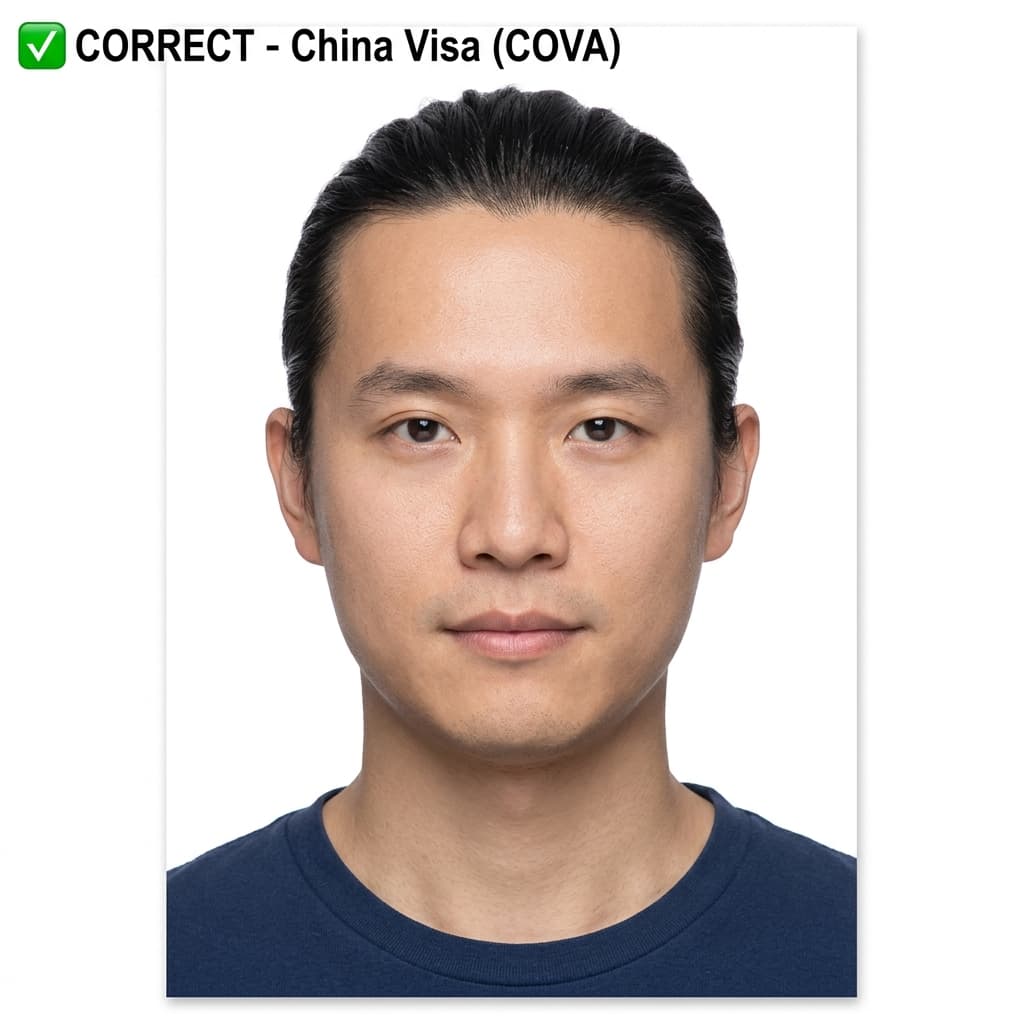
Pass example
Correct photo
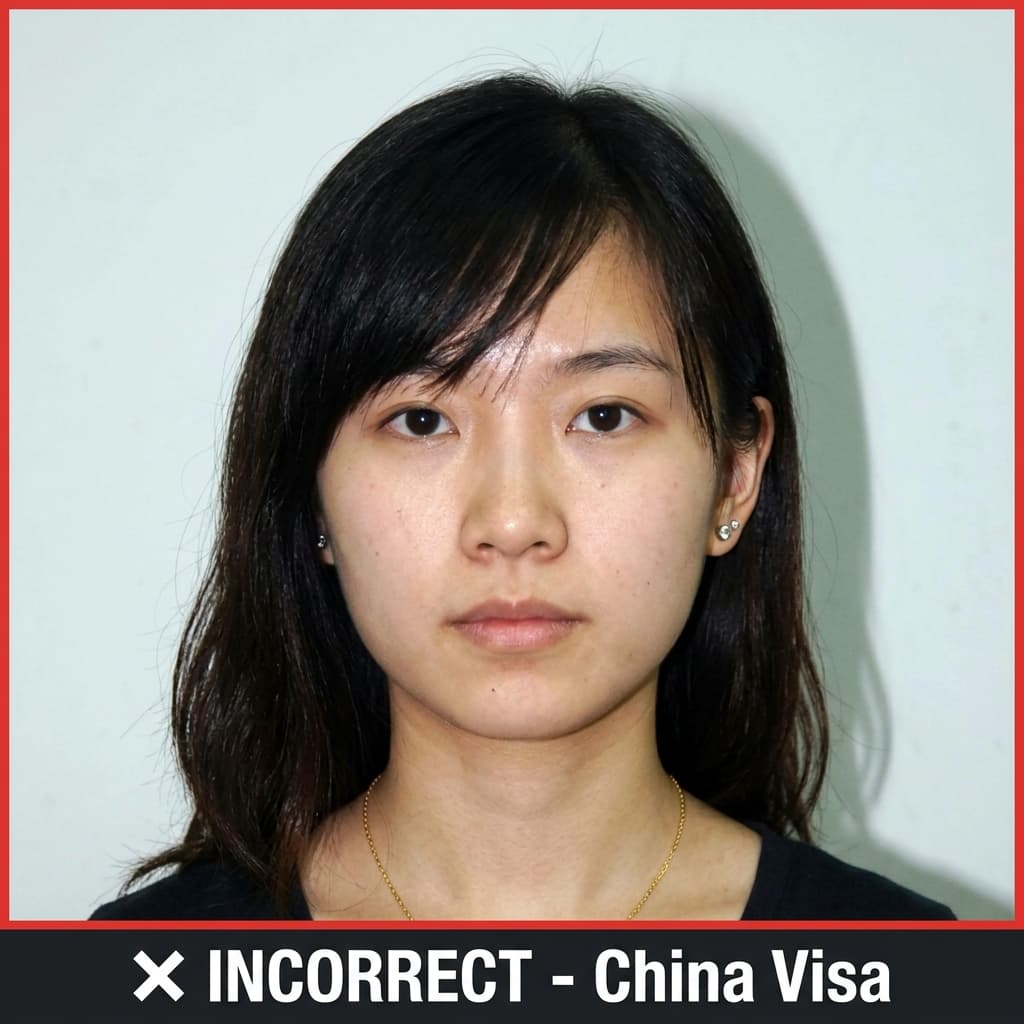
Common rejection risk
Incorrect photo
Real China Visa Rejection Data
57.0% of China Visa photos were rejected on first submission, based on 502 checks run through VisaPhotoCheck.
Most common reasons a rejected photo failed
- Accessories (glasses, hats, headphones)59%
- Crop or framing20%
- Resolution12%
- Lighting or shadows4%
- Expression3%
- sharpness3%
- Photo authenticity0%
- Head pose or angle0%
Each figure is the share of rejected China Visa photos that failed that specific check. A single rejection often fails more than one check, so these do not add up to 100%.
Based on VisaPhotoCheck's own China Visa submissions — this reflects our users, not an official or industry-wide rejection rate.
How China Visa compares to similar documents
Every figure below is read from the same rule profiles this checker validates against, so it says what actually differs rather than what sounds different.
What changes for nearby documents
- Australia Visa wants 35×45mm, not 33×48mm; head fills 71–80% of the frame, not 58–69%; file limit 3500 KB, not 120 KB; an off-white or light grey background, not pure white.
- Philippines Passport wants 35×45mm, not 33×48mm; head fills 71–80% of the frame, not 58–69%; file limit 1000 KB, not 120 KB; an off-white or light grey background, not pure white.
- India OCI Card wants 51×51mm, not 33×48mm; head fills 70–80% of the frame, not 58–69%; file limit 200 KB, not 120 KB; an off-white or light grey background, not pure white.
- New Zealand Online Visa wants 900×1200px, not 33×48mm; head fills 70–80% of the frame, not 58–69%; file limit 3140 KB, not 120 KB; an off-white or light grey background, not pure white.
Frequently Asked Questions
Related Document Requirements
COVA Photo Rejected
Fix China visa photo rejections in the COVA online application. Resize to the 33x48mm profile, keep the file between 40K...
US Visa (DS-160)
Online US visa photo tool: check your photo free, then get a 600x600px DS-160 JPEG at 240KB or less with a plain backgro...
Schengen Visa
Check and fix your Schengen visa photo online. Get a 35x45mm photo for France, Germany, Italy, Spain and other Schengen ...
35x45mm Photo
Check a 35x45mm (3.5x4.5 cm) passport or visa photo online, free. Exact size in mm and pixels, head height and backgroun...
UAE (Dubai) Visa
Dubai & UAE visa photo size is 35x45mm (413×531 px). Check yours free online: auto-crop, white background fix, and under...