US Visa
US Visa Photo 600x600px Checker for DS-160 Upload
Fix and check your US visa photo for DS-160 upload. Create a 600x600px JPEG at 240KB or less with a plain background, correct head size, neutral expression, and no glasses.
Last updated Jul 14, 2026
Verified against the official source · Oct 8, 2026Official US Visa Photo Dimensions & Requirements (600x600px)
The US Department of State has strict requirements for photos uploaded to the CEAC (Consular Electronic Application Center) portal. Your photo must be a recent color photo taken within the last 6 months, exported as a square JPEG, and framed correctly before DS-160 submission.
- Dimensions: Square aspect ratio, minimum 600x600 pixels, maximum 1200x1200 pixels.
- File size: 240 KB (kilobytes) or less.
- Background: Plain white or off-white. No shadows, textures, or lines.
- Head Size: Head must be between 1 inch and 1 3/8 inches (22mm - 35mm), or 50% to 69% of the image's total height.
- Eyes: Both eyes must be open and clearly visible. Eye level should be 56-69% from the bottom.
Fix DS-160 Photo Upload Errors Before You Submit
Most DS-160 photo upload errors happen after the user already has an appointment or form open, so speed matters. VisaPhotoCheck previews the corrected result first, then lets you unlock only when the 600x600px output and measurable checks are ready.
- Resize and crop to 600x600px without stretching the face.
- Compress the JPEG under the DS-160 240KB limit while keeping facial clarity.
- Replace busy or colored backgrounds with a clean white/off-white background.
- Check head height, eye line, centering, glasses, expression, and lighting before payment.
How to Fix Background for US Visa Photo
The DS-160 form checks the digital file before submission. Start with a photo taken against a plain white or off-white background and keep the applicant's appearance natural:
- File Format: JPEG (.jpg) only.
- Color Space: sRGB (24 bits per pixel).
- Compression: Compression ratio should be ≤ 20:1 to avoid artifacts.
- No appearance changes: Do not use beauty filters, skin smoothing, generated facial details, or eye-color edits.
Top Rejection Reasons
Avoid these common mistakes that lead to DS-160 upload errors or visa interview delays:
- Glasses: NOT allowed since 2016 (even prescription glasses). Remove them.
- Shadows: Heavy shadows behind the head or on the face (often from side lighting) will cause rejection.
- Low Resolution: Photos that are blurry, pixelated, or have compression artifacts.
- Bad background: Colored, textured, shadowed, or cluttered backgrounds; use plain white or off-white.
- Expression: Smiling is not recommended. Maintain a neutral expression with mouth closed.
What If the DS-160 Confirmation Page Shows an X?
An X where the photo should appear on the DS-160 confirmation page means the upload failed. The State Department says to bring one printed photograph that meets the requirements and follow the instructions from the U.S. embassy or consulate where you will apply.
If the confirmation page displays your photo, the digital upload succeeded. Final acceptance still belongs to the embassy or consulate, so keep the original image and review the instructions for your application location.
Why Use Our Free US Visa Photo Checker?
Our AI-powered tool is specifically calibrated for the CEAC portal's strict validation algorithms. Avoid DS-160 upload errors and embassy rejection:
- Automatic cropping to 600x600 pixels with correct head sizing (50-69%).
- Smart compression to <240KB without losing facial clarity.
- AI background removal - Replaces any background with compliant plain white.
- Shadow and lighting issue detection.
- Head tilt and alignment verification.
- 30-day money-back policy for eligible issues.
Photo Examples
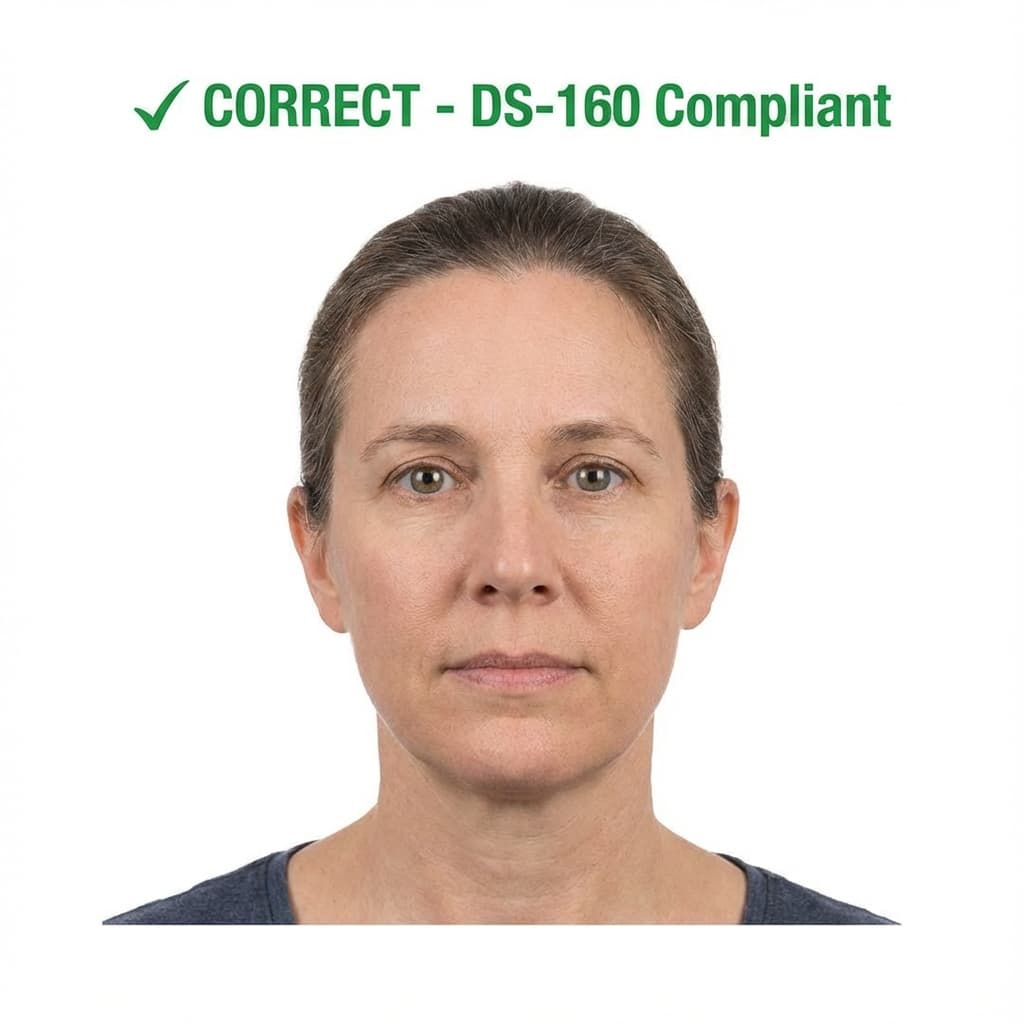
Pass example
Correct US Visa photo: 600x600px, plain white background, neutral expression, no glasses
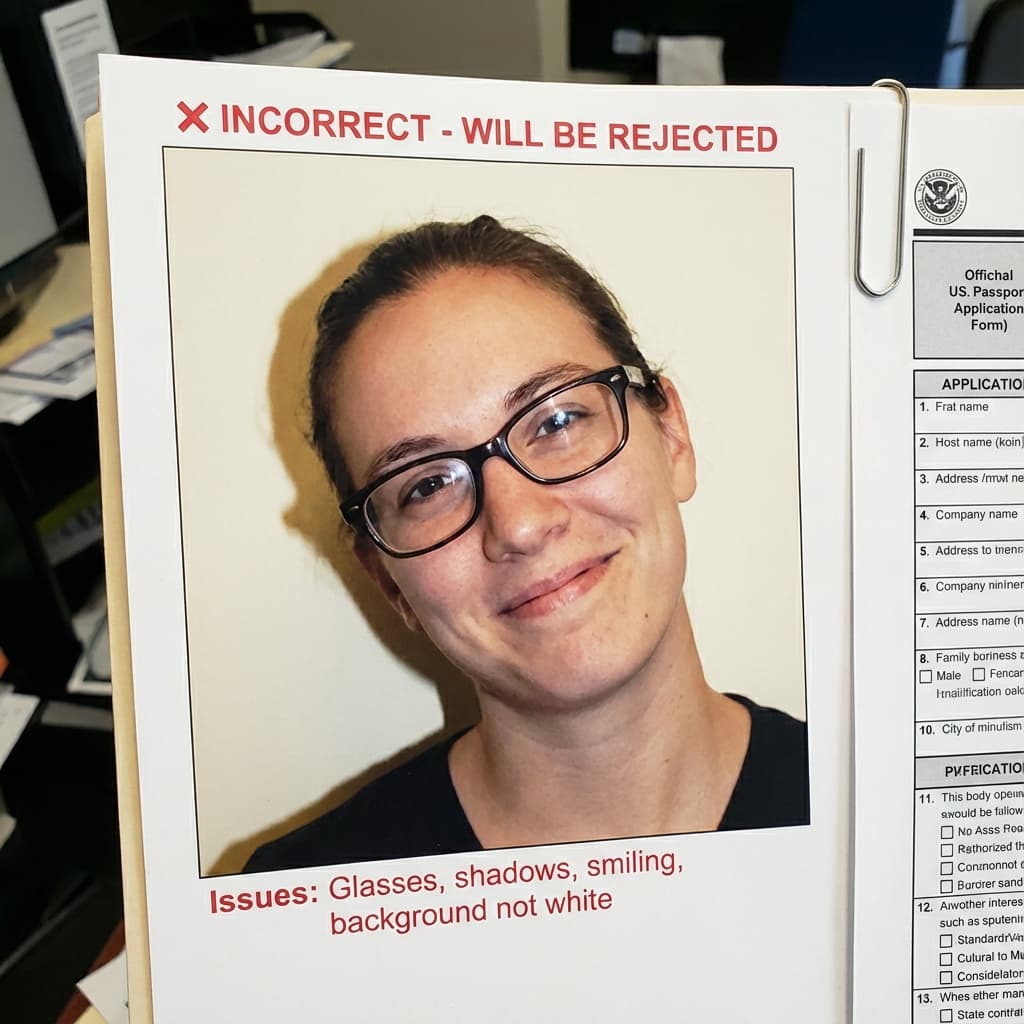
Common rejection risk
Incorrect US Visa photo: Wearing glasses, shadow on background, smiling, off-white background
Real US Visa (DS-160) Rejection Data
35.5% of US Visa (DS-160) photos were rejected on first submission, based on 543 checks run through VisaPhotoCheck.
Most common reasons a rejected photo failed
- Crop or framing39%
- Accessories (glasses, hats, headphones)29%
- Lighting or shadows12%
- Resolution11%
- Head pose or angle8%
- Expression6%
- Photo authenticity5%
- sharpness2%
- Background1%
Each figure is the share of rejected US Visa (DS-160) photos that failed that specific check. A single rejection often fails more than one check, so these do not add up to 100%.
Based on VisaPhotoCheck's own US Visa (DS-160) submissions — this reflects our users, not an official or industry-wide rejection rate.
How US Visa (DS-160) compares to similar documents
Every figure below is read from the same rule profiles this checker validates against, so it says what actually differs rather than what sounds different.
The same specification
A photo that passes for US Visa (DS-160) meets the same measurable requirements as US Green Card Lottery (DV), India Visa and US Immigration (USCIS). Size, head height and background are identical; check each portal's own file-size limit before uploading.
What changes for nearby documents
- US Passport Online Renewal wants 1200×1200px, not 600×600px; file limit 10240 KB, not 240 KB.
- US Global Entry / TSA PreCheck wants head fills 55–75% of the frame, not 50–69%.
DS-160 help center
Solve the exact US visa photo problem
Use the focused guide that matches what CEAC is asking you to fix. All four pages use the same current US visa photo profile.
DS-160 photo requirements
Official dimensions, head size, background, glasses, and JPEG rules.
Fix a DS-160 upload error
Troubleshoot CEAC rejections before returning to the application.
Compress below 240KB
Reduce file size after cropping without damaging facial detail.
Complete CEAC rejection guide
Diagnose each “photo does not meet requirements” message step by step.
Frequently Asked Questions
Related Document Requirements
DS-160 Photo
Free DS-160 photo checker for U.S. visa applications. Validate your 600x600px photo against CEAC upload rules, including...
B1/B2 Visa Photo
Free B1/B2 visa photo checker for U.S. visitor visa applicants. Instantly validate your digital photo for DS-160 upload ...
F1 Visa Photo
Free F1 student visa photo checker. Make sure your U.S. F1 visa photo meets DS-160 rules for size, background, expressio...
US Passport
US passport photo requirements from the State Department: 2x2 inches, head 1 to 1 3/8 inches, plain white or off-white b...
US Green Card Lottery (DV)
DV lottery photo rules quoted from the State Department: a 600x600px square JPEG under 240KB, head 50–69% and eyes 56–69...
Global Entry Photo
You do not bring a photo for Global Entry: the CBP officer takes it at your enrollment interview. Here is what CBP says.
USCIS Photo
USCIS photo requirements for Green Card (I-485), EAD (I-765), Naturalization (N-400) and I-130: 2×2 inches, white to off...
India eVisa
Free online India eVisa photo checker. AI-powered validation ensures 2x2 inch (600x600px) compliance with Indian immigra...