US Immigration (USCIS)
USCIS Photo Checker — Green Card, EAD, N-400 (2×2 inch)
Check your 2×2 inch USCIS photo online, free — Green Card (I-485), EAD (I-765), Naturalization (N-400), and I-130. Auto-crop to 600×600px and verify head size before you file.
Last updated May 11, 2026
Verified against the official source · May 11, 2026USCIS Photo Specifications (2×2 inch)
USCIS uses the same 2×2 inch photo standard for Green Card, naturalization, work authorization, and family petition forms. The photo is glued or stapled to the application packet, so getting the size, background, and head height right is critical to avoid a Request for Evidence (RFE).
- Size: 2×2 inches (51×51mm) — 600×600 pixels at 300 DPI.
- Background: plain white or off-white. No shadows, textures, or coloured backgrounds.
- Head height: 1 inch to 1⅜ inches (25–35mm), 50–69% of the image height.
- Expression: neutral, mouth closed, eyes open and looking directly at the camera.
- Taken within the last 30 days — USCIS is stricter than the passport's 6-month rule.
- No glasses (since 2016), no head coverings except for religious reasons.
Which USCIS Forms Need This Photo?
The 2×2 USCIS photo standard covers nearly every adjustment, work permit, naturalization, and family petition form. Two identical printed photos are typically required per applicant.
- I-485 — Adjustment of Status (Green Card).
- I-765 — Application for Employment Authorization (EAD).
- N-400 — Application for Naturalization.
- I-130 — Petition for Alien Relative.
- I-131 — Application for Travel Document / Advance Parole.
- I-90 — Green Card renewal/replacement.
- I-589 — Asylum applications.
Top USCIS Photo Rejection Reasons (and How to Fix Them)
USCIS photo rejections delay applications by weeks. The most common issues are easy to fix before printing.
- Photo older than 30 days — retake.
- Glasses (any kind) — not allowed since 2016.
- Background is off-white, grey, or shows wall texture.
- Head height outside 1–1⅜ inches.
- Smiling or open mouth.
- Photo printed too small or stretched.
- Heavy filters or skin smoothing changing your features.
Print Two Copies on 4×6 Paper
USCIS typically wants two identical 2×2 photos paper-clipped or stapled to the application. Most photo print services let you print two 2×2 photos on a single 4×6 sheet — VisaPhotoCheck includes a printable 4×6 template option after checkout.
- Print both photos at exactly 2×2 inches — no resize at the printer.
- Lightly write your A-Number on the back in pencil if instructed by the form.
- Trim each photo to a clean 2×2 inch square before attaching.
Photo Examples
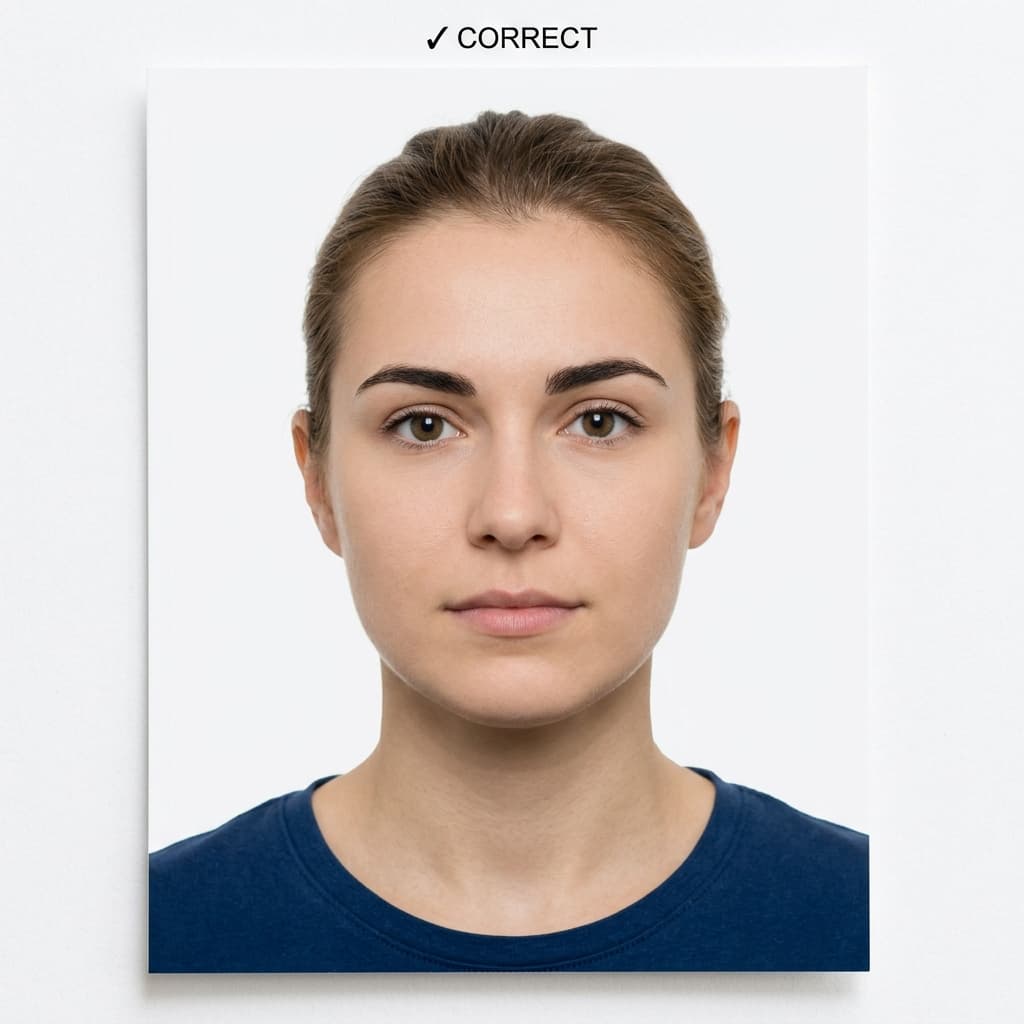
Pass example
Correct photo
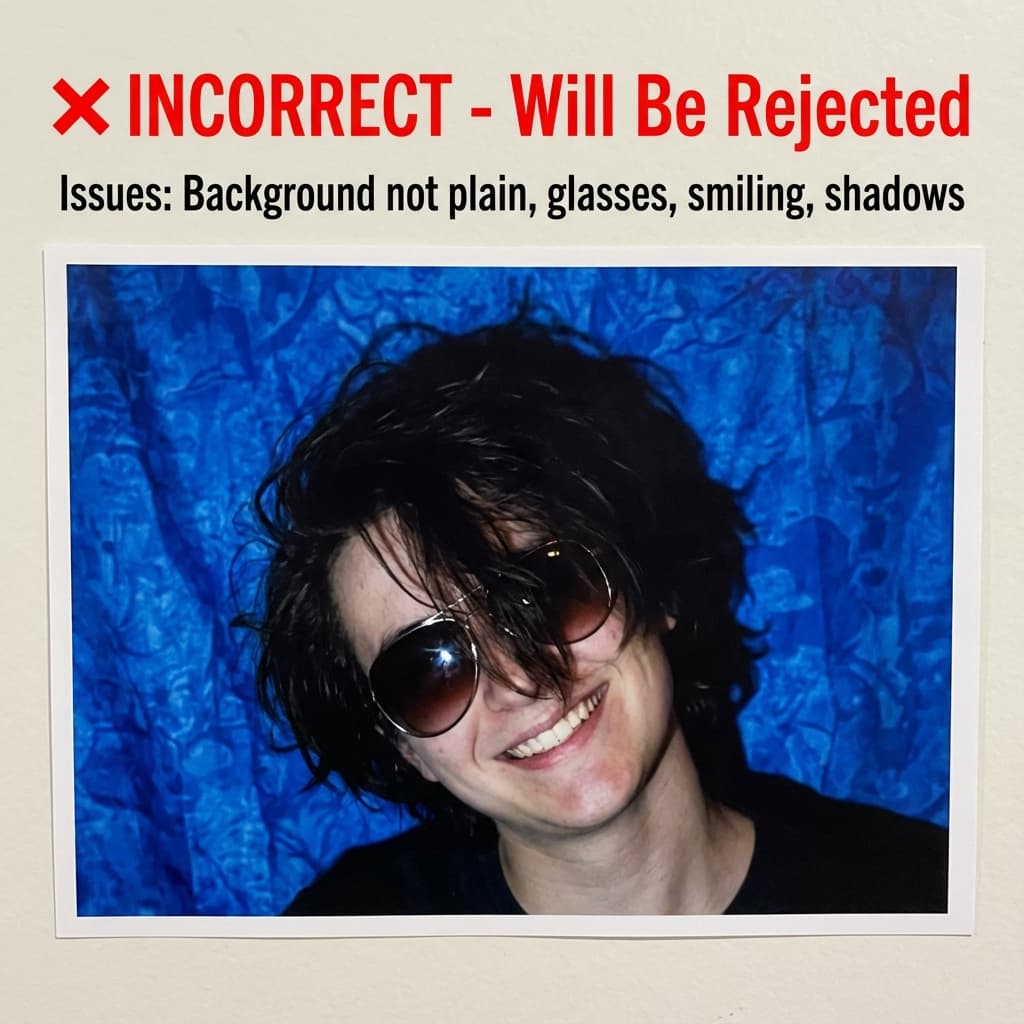
Common rejection risk
Incorrect photo
How USCIS Photo compares to similar documents
Every figure below is read from the same rule profiles this checker validates against, so it says what actually differs rather than what sounds different.
The same specification
A photo that passes for USCIS Photo meets the same measurable requirements as US Green Card Lottery (DV) and India Visa. Size, head height and background are identical; check each portal's own file-size limit before uploading.
What changes for nearby documents
- US Passport Online Renewal wants 1200×1200px, not 600×600px; file limit 10240 KB, not 240 KB.
- US Global Entry / TSA PreCheck wants head fills 55–75% of the frame, not 50–69%.
Frequently Asked Questions
Related Document Requirements
US Visa (DS-160)
Fix and check your US visa photo for DS-160 upload. Create a 600x600px JPEG at 240KB or less with a plain background, co...
US Passport
Check and fix your US passport photo online. Create a 2x2 inch passport photo with white background, correct head size, ...
US Green Card Lottery (DV)
Free AI-powered DV-2027 Lottery photo checker. Instant validation of your 600x600px photo against official State Departm...
Global Entry Photo
Prepare a 2×2 inch Global Entry or TSA PreCheck photo for CBP enrollment. 600×600px JPEG, plain white background, neutra...
India eVisa
Free online India eVisa photo checker. AI-powered validation ensures 2x2 inch (600x600px) compliance with Indian immigra...
Schengen Visa
Check and fix your Schengen visa photo online. Create a 35x45mm biometric photo for France, Germany, Italy, Spain, and o...
35x45mm Photo
Check a 35x45mm (3.5x4.5 cm) passport or visa photo online, free. Exact size in mm and pixels, head height and backgroun...