US Passport
US Passport Photo Requirements (2x2 inch)
US passport photo requirements from the State Department: 2x2 inches, head 1 to 1 3/8 inches, plain white or off-white background. The State Department does not accept photos changed with software, so we explain the rules and do not make this photo.
Last updated Oct 9, 2026
Verified against the official source · Oct 9, 2026Official US Passport Photo Dimensions & Requirements (2x2 inch)
Your passport photo must meet specific biometric standards for facial recognition. These rules apply to both new applications and renewals, and a simple square crop is not enough if the head size, background, or lighting is wrong.
- Size: 2x2 inches (51x51mm) for printed photos.
- Head Size: Between 1 inch and 1 3/8 inches (25-35mm) from chin to crown.
- Background: Plain white or off-white. No shadows or patterns.
- Expression: Neutral facial expression or a natural smile. Both eyes open.
- Attire: Everyday clothing. No uniforms or camouflage.
Online Renewal vs Printed Passport Photos
Depending on how you apply, you need a digital file or printed photos. Either way the State Department asks for the original, unedited photo.
- Online Renewal: Digital JPEG file, at least 600x600 pixels, no compression artifacts.
- Mail/In-Person: 2 physical photos printed on matte or glossy photo quality paper.
- Printing: Print at actual size, not fit-to-page, so the photo stays 2x2 inches.
Common Mistakes to Avoid
Don't get your application suspended. Avoid these errors:
- Selfies: Handheld selfies distort the face. Use a tripod or ask a friend.
- Glasses: Not allowed since 2016. Remove them.
- Shadows: Ensure even lighting. No shadows under nose or ears.
- Editing: Do not change the photo with software, apps, filters or AI. The State Department checks for it.
Why We Do Not Make This Photo
The State Department says to submit the original, unedited photo without filters or digital changes, and not to change your photo using computer software, phone apps or filters. It lists a background cropped out with a retouching tool among the photos it does not accept. Replacing the background is how an online photo maker works, so we do not offer one for US passports.
- Take the photo against a real plain white or off-white wall.
- Have someone else take it from several feet away. No selfies.
- If the background is not white, fix the lighting and background and take a new photo.
- A US visa or DV lottery photo is a different document, and we do make those.
Photo Examples

Pass example
Correct US Passport photo: 2x2 inch ratio, white background, neutral expression
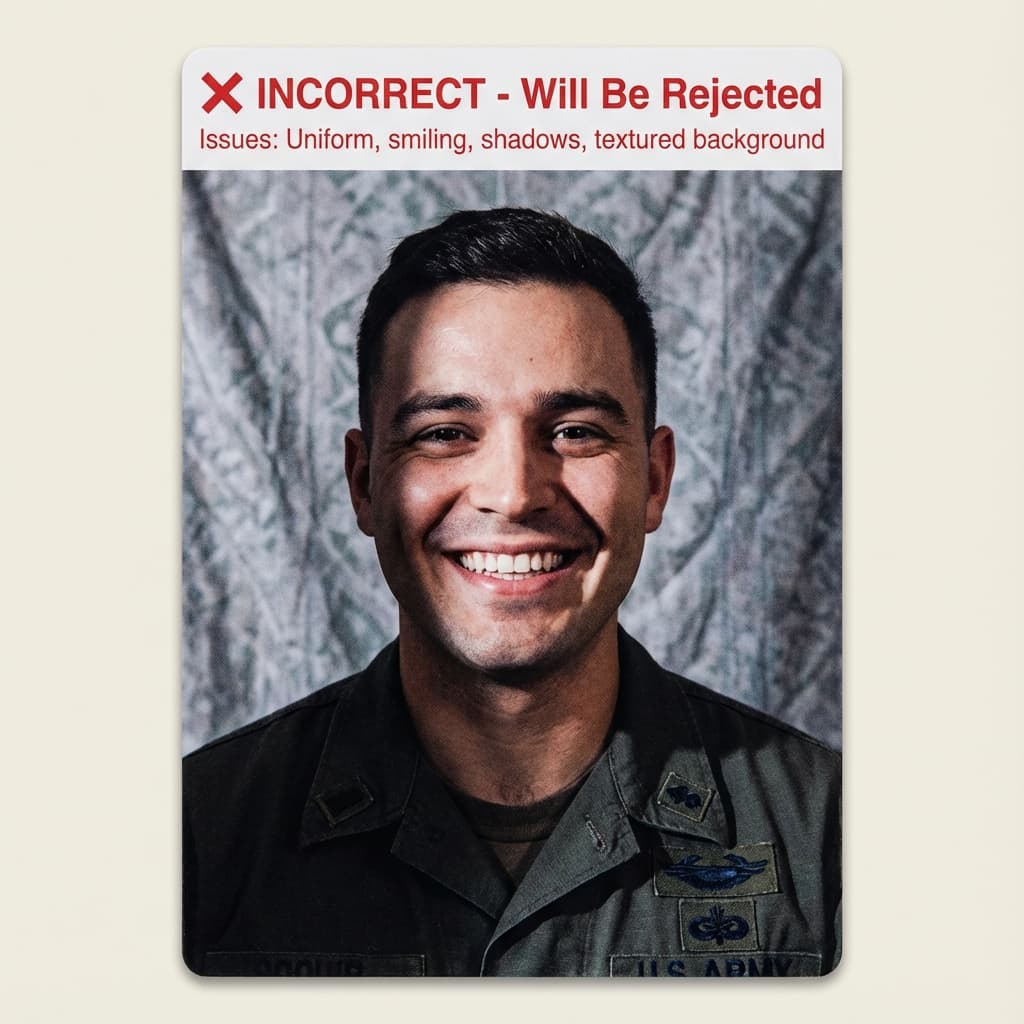
Common rejection risk
Incorrect US Passport photo: Uniform, shadows, or textured background
Real US Passport Rejection Data
36.2% of US Passport photos were rejected on first submission, based on 138 checks run through VisaPhotoCheck.
Most common reasons a rejected photo failed
- Expression30%
- Crop or framing26%
- Head pose or angle26%
- Accessories (glasses, hats, headphones)18%
- Lighting or shadows16%
- Resolution12%
- Photo authenticity6%
- sharpness2%
Each figure is the share of rejected US Passport photos that failed that specific check. A single rejection often fails more than one check, so these do not add up to 100%.
Based on VisaPhotoCheck's own US Passport submissions — this reflects our users, not an official or industry-wide rejection rate.
How US Passport compares to similar documents
Every figure below is read from the same rule profiles this checker validates against, so it says what actually differs rather than what sounds different.
What changes for nearby documents
- US Passport Online Renewal wants 1200×1200px, not 51×51mm; file limit 10240 KB, not 240 KB.
- US Global Entry / TSA PreCheck wants head fills 55–75% of the frame, not 49–69%.
Frequently Asked Questions
Related Document Requirements
US Visa (DS-160)
Fix and check your US visa photo for DS-160 upload. Create a 600x600px JPEG at 240KB or less with a plain background, co...
US Green Card Lottery (DV)
Free AI-powered DV-2027 Lottery photo checker. Instant validation of your 600x600px photo against official State Departm...
Global Entry Photo
You do not bring a photo for Global Entry: the CBP officer takes it at your enrollment interview. Here is what CBP says.
USCIS Photo
USCIS photo requirements for Green Card (I-485), EAD (I-765), Naturalization (N-400) and I-130: 2×2 inches, white to off...
India OCI Photo
Prepare an India OCI application photo as a square JPEG under 200KB with 80% face coverage and a plain light-coloured ba...
Schengen Visa
Check and fix your Schengen visa photo online. Create a 35x45mm biometric photo for France, Germany, Italy, Spain, and o...
35x45mm Photo
Check a 35x45mm (3.5x4.5 cm) passport or visa photo online, free. Exact size in mm and pixels, head height and backgroun...