US Visa
DS-160 Photo Upload Error Fix Online
Fix DS-160 photo upload errors online. Resize to 600x600px, compress under 240KB, clean the background, and preview head-size checks before paying to download.
Last updated May 6, 2026
Verified against the official source · Jul 13, 2026Why the DS-160 Photo Upload Fails
The CEAC upload step can reject photos that look acceptable to the eye but fail digital checks. The most common causes are wrong square size, file size above the limit, glasses, shadows, white-background problems, and head size outside the accepted range.
- Export as JPEG under the DS-160 file-size limit.
- Use a square photo in the official pixel range.
- Remove glasses and visible glare.
- Keep a clean white or off-white background.
- Check head height and eye line after resizing, not before.
Fast Fix Before You Return to CEAC
Upload the original camera photo, choose US Visa, and preview a corrected DS-160 file before checkout. The final download is formatted for the 600x600px U.S. visa profile with the measurable checks visible first.
- 600x600px square crop without face stretching.
- JPEG compression for DS-160 upload limits.
- White/off-white background cleanup.
- Biometric measurement preview before payment.
Photo Examples
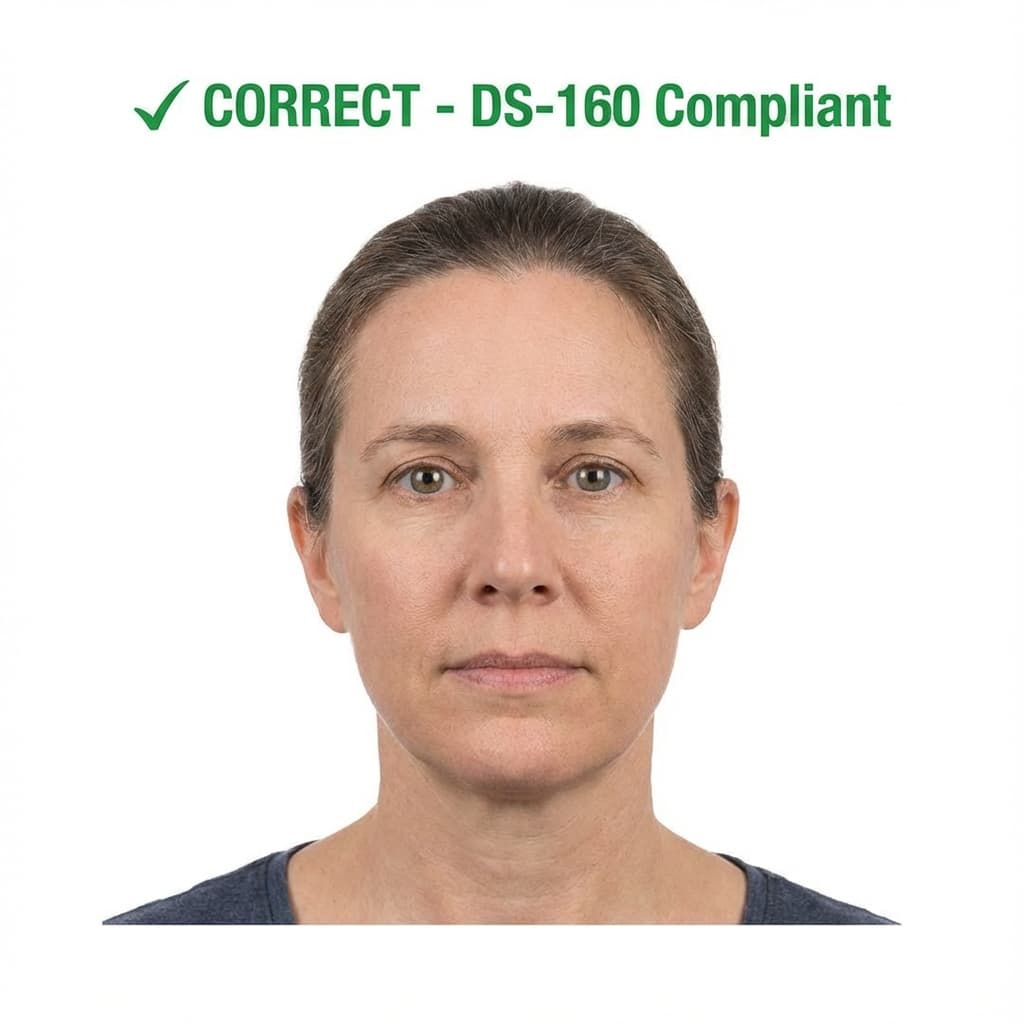
Pass example
Correct photo
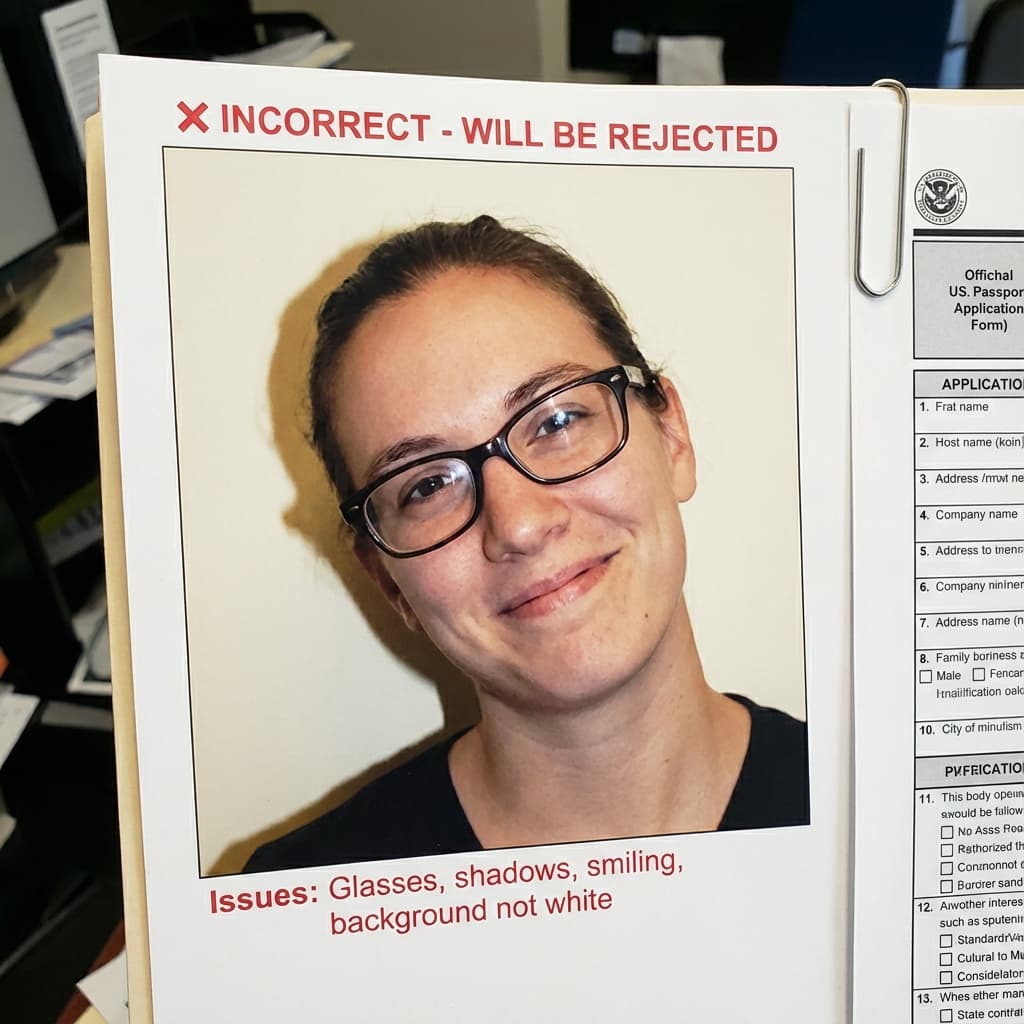
Common rejection risk
Incorrect photo
Real DS-160 Upload Error Rejection Data
35.5% of DS-160 Upload Error photos were rejected on first submission, based on 543 checks run through VisaPhotoCheck.
Most common reasons a rejected photo failed
- Crop or framing39%
- Accessories (glasses, hats, headphones)29%
- Lighting or shadows12%
- Resolution11%
- Head pose or angle8%
- Expression6%
- File size or format5%
- sharpness2%
- Background1%
Each figure is the share of rejected DS-160 Upload Error photos that failed that specific check. A single rejection often fails more than one check, so these do not add up to 100%.
Based on VisaPhotoCheck's own DS-160 Upload Error submissions — this reflects our users, not an official or industry-wide rejection rate.
DS-160 help center
Solve the exact US visa photo problem
Use the focused guide that matches what CEAC is asking you to fix. All four pages use the same current US visa photo profile.
US visa photo checker
The main 600×600px DS-160 checker and corrected-photo workflow.
DS-160 photo requirements
Official dimensions, head size, background, glasses, and JPEG rules.
Compress below 240KB
Reduce file size after cropping without damaging facial detail.
Complete CEAC rejection guide
Diagnose each “photo does not meet requirements” message step by step.
Frequently Asked Questions
Related Document Requirements
US Visa (DS-160)
Fix and check your US visa photo for DS-160 upload. Create a 600x600px JPEG at 240KB or less with a plain background, co...
DS-160 Photo
Free DS-160 photo checker for U.S. visa applications. Validate your 600x600px photo against CEAC upload rules, including...
B1/B2 Visa Photo
Free B1/B2 visa photo checker for U.S. visitor visa applicants. Instantly validate your digital photo for DS-160 upload ...
F1 Visa Photo
Free F1 student visa photo checker. Make sure your U.S. F1 visa photo meets DS-160 rules for size, background, expressio...
US Passport
Check and fix your US passport photo online. Create a 2x2 inch passport photo with white background, correct head size, ...
US Green Card Lottery (DV)
Free AI-powered DV-2027 Lottery photo checker. Instant validation of your 600x600px photo against official State Departm...
Global Entry Photo
Prepare a 2×2 inch Global Entry or TSA PreCheck photo for CBP enrollment. 600×600px JPEG, plain white background, neutra...
USCIS Photo
Check your 2×2 inch USCIS photo online, free — Green Card (I-485), EAD (I-765), Naturalization (N-400), and I-130. Auto-...